PHP: nested use of array_* is a disguised array_reduce
I feel like in JavaScript you see a lot of [...].reduce() but not so much in PHP. It may be a shame not to use it, because it can help you write more readable code with fewer iterations.
array_reduce is all other array_* …
Any array_* function can be replaced with an array_reduce, let’s see some examples. Don’t be fooled by its name, it doesn’t necessarily reduce your array to fewer elements.
array_map
$original = [
    [
        'id' => '1111',
        'name' => 'first',
    ],
    [
        'id' => '2222',
        'name' => 'second',
    ],
];

var_dump(
    array_map(
        static function (array $item): string {
            return "{$item['id']}#{$item['name']}";
        },
        $original
    )
);
is the same as
$original = [
    [
        'id' => '1111',
        'name' => 'first',
    ],
    [
        'id' => '2222',
        'name' => 'second',
    ],
];

var_dump(
    array_reduce(
        $original,
        static function (array $result, array $item): array {
            $result[] = "{$item['id']}#{$item['name']}";
            return $result;
        },
        []
    )
);
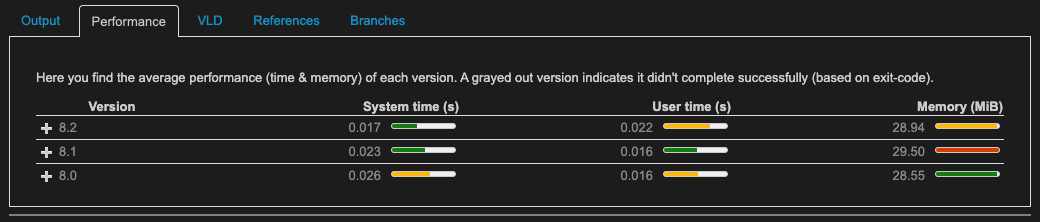
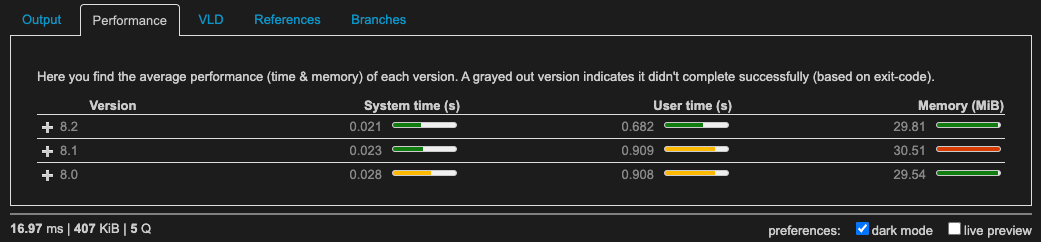
Performance comparison
With array_map
With array_reduce
array_filter
$original = [
    [
        'id' => '1111',
        'name' => 'first',
    ],
    [
        'id' => '2222',
        'name' => 'second',
    ],
];

var_dump(
    array_filter(
        $original,
        static function (array $item): bool {
            return str_starts_with($item['id'], '11');
        }
    )
);
is the same as
$original = [
    [
        'id' => '1111',
        'name' => 'first',
    ],
    [
        'id' => '2222',
        'name' => 'second',
    ],
];

var_dump(
    array_reduce(
        $original,
        static function (array $result, array $item): array {
            if (str_starts_with($item['id'], '11')) {
                $result[] = $item;
            }
            return $result;
        },
        []
    )
);
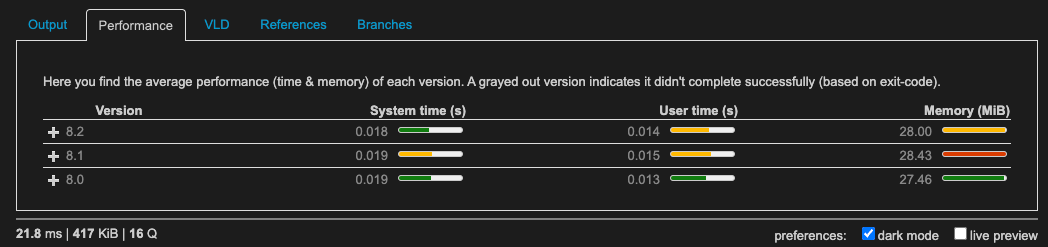
Performance comparison
With array_filter

With array_reduce
array_column
$original = [
    [
        'id' => '1111',
        'name' => 'first',
    ],
    [
        'id' => '2222',
        'name' => 'second',
    ],
];

var_dump(
    array_column(
        $original,
        'name',
        'id'
    )
);
is the same as
$original = [
    [
        'id' => '1111',
        'name' => 'first',
    ],
    [
        'id' => '2222',
        'name' => 'second',
    ],
];

var_dump(
    array_reduce(
        $original,
        static function (array $result, array $item): array {
            $result[$item['id']] = $item['name'];
            return $result;
        },
        []
    )
);
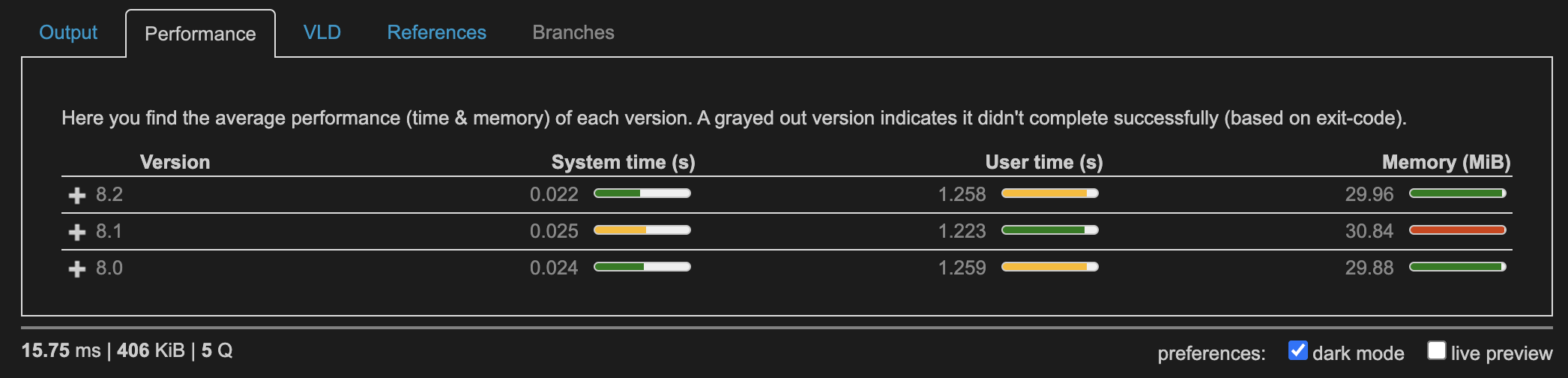
Performance comparison
With array_column
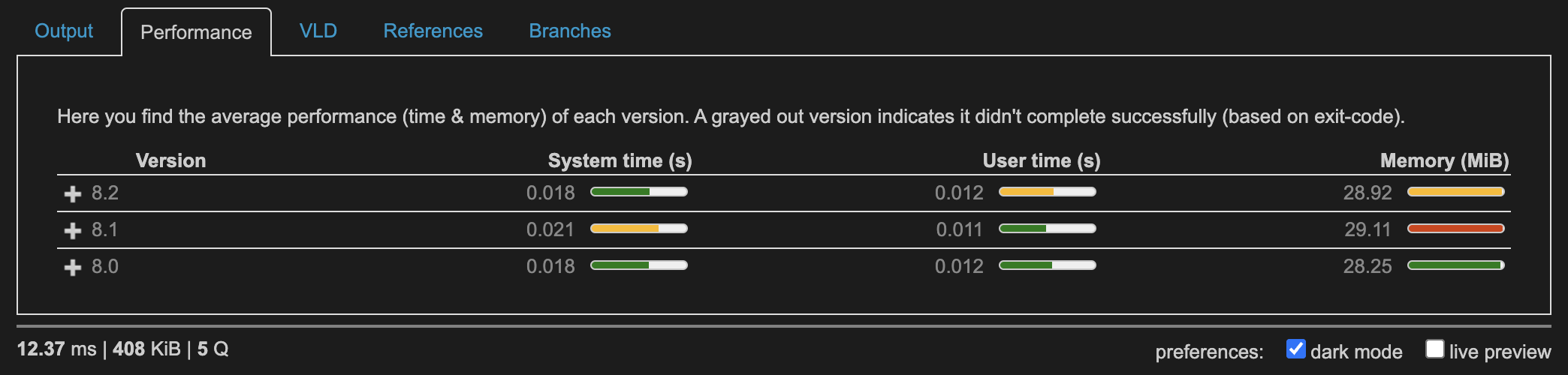
With array_reduce
… but more powerful
Combining multiple array_* calls can be hard to read and suffers from multiple iterations.
$original = [
    [
        'id' => '1111',
        'name' => 'first',
    ],
    [
        'id' => '2222',
        'name' => 'second',
    ],
];

var_dump(
    array_map(
        static function (array $item): string {
            return "{$item['id']}#{$item['name']}";
        },
        array_filter(
            $original,
            static function (array $item): bool {
                return str_starts_with($item['id'], '11');
            }
        )
    )
);
can be written as
$original = [
    [
        'id' => '1111',
        'name' => 'first',
    ],
    [
        'id' => '2222',
        'name' => 'second',
    ],
];

var_dump(
    array_reduce(
        $original,
        static function (array $result, array $item): array {
            if (str_starts_with($item['id'], '11')) {
                $result[] = "{$item['id']}#{$item['name']}";
            }
            return $result;
        },
        []
    )
);
which requires only one iteration over the $original array and makes it clear what we do with each element in this array.
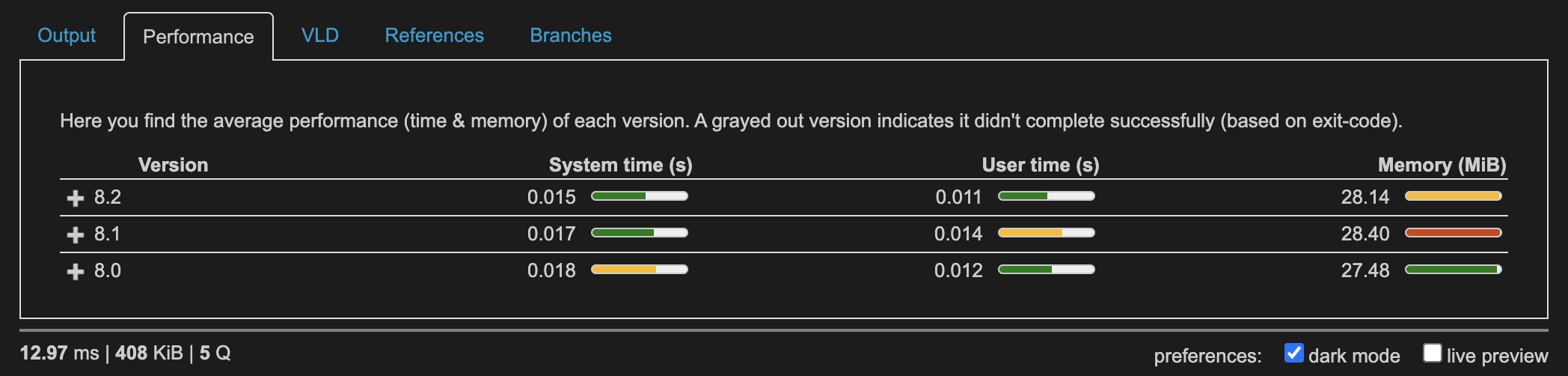
Performance comparison
With nested operations
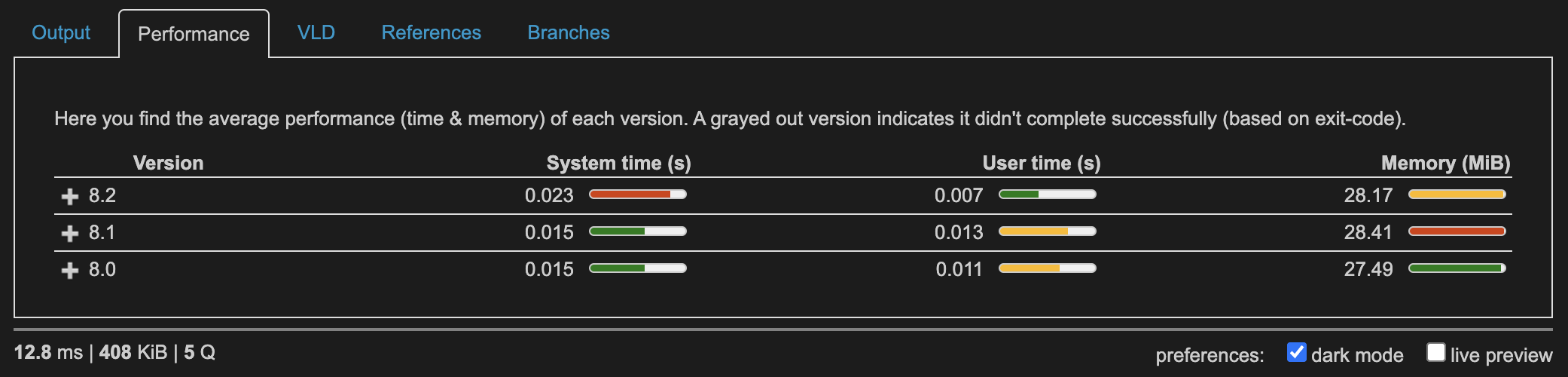
With array_reduce
Beware some feature may require a weird syntax
There are still caveats to using it, because it doesn’t give you the key of each item you iterate over, which means that, basically:
$original = [
    'key1' => [
        'id' => '1111',
        'name' => 'first',
    ],
    'key2' => [
        'id' => '2222',
        'name' => 'second',
    ],
];

var_dump(
    array_map(
        static function (array $item): string {
            return "{$item['id']}#{$item['name']}";
        },
        $original
    )
);
is NOT the same as
$original = [
    'key1' => [
        'id' => '1111',
        'name' => 'first',
    ],
    'key2' => [
        'id' => '2222',
        'name' => 'second',
    ],
];

var_dump(
    array_reduce(
        $original,
        static function (array $result, array $item): array {
            $result[] = "{$item['id']}#{$item['name']}";
            return $result;
        },
        []
    )
);
The array_map would preserve the keys, but the array_reduce will convert it to a list (with incremental numeric keys).
To have access to the keys as well you need a “trick”:
$original = [
    'key1' => [
        'id' => '1111',
        'name' => 'first',
    ],
    'key2' => [
        'id' => '2222',
        'name' => 'second',
    ],
];

var_dump(
    array_reduce(
-       $original,
+       array_keys($original),
-       static function (array $result, array $item): array {
+       static function (array $result, array $key) use ($original): array {
+           $item = $original[$key];
-           $result[] = "{$item['id']}#{$item['name']}";
+           $result[$key] = "{$item['id']}#{$item['name']}";
            return $result;
        },
        []
    )
);
Advanced example
The following example is based on these assumptions:
$canonicalIdsrepresents the ids that you already have in storage (e.g. in your database)- The user makes a
PUTrequest on your collection, meaning they want to update, create, and delete some resources in the same request.
$canonicalIds = [
    'first',
    'second',
    'third',
    'fourth',
    'fifth',
    'sixth',
];

$putContent = [
    [
        'id' => 'fifth',
        'value' => 55,
    ],
    [
        'id' => 'second',
        'value' => 22,
    ],
    [
        'id' => 'fourth',
        'value' => 44,
    ],
    [
        'id' => null,
        'value' => 7,
    ],
];

[$toCreate, $toUpdate] = array_reduce(
    $putContent,
    static function (array $carry, array $item) use ($canonicalIds): array {
        [$toCreate, $toUpdate] = $carry;

        if (null === $item['id']) {
            $toCreate[] = $item;
        } elseif (true === in_array($item['id'], $canonicalIds, true)) {
            $toUpdate[$item['id']] = $item;
        }

        return [
            $toCreate,
            $toUpdate
        ];
    },
    [
        [],
        []
    ]
);

$toDelete = array_diff($canonicalIds, array_keys($toUpdate));

var_dump($toCreate, $toUpdate, $toDelete);
You now have 3 different variables, each with its own context. You can now safely tell Doctrine, for example, what to do for each id (INSERT, UPDATE, or DELETE).
Comparison
Basic equivalent with multiple usage of array_* functions:
<?php

$canonicalIds = [
    'first',
    'second',
    'third',
    'fourth',
    'fifth',
    'sixth',
];

$putContent = [
    [
        'id' => 'fifth',
        'value' => 55,
    ],
    [
        'id' => 'second',
        'value' => 22,
    ],
    [
        'id' => 'fourth',
        'value' => 44,
    ],
    [
        'id' => null,
        'value' => 7,
    ],
];

$toCreate = array_filter($putContent, static function (array $item): bool {
    return null === $item['id'];
});

$toUpdate = array_uintersect(
    $putContent,
    array_map(static function (string $id): array {
        return ['id' => $id];
    }, $canonicalIds),
    static function (array $putItem, array $canonicalItem): int {
        return $putItem['id'] <=> $canonicalItem['id'];
    }
);

$toDelete = array_diff($canonicalIds, array_column($toUpdate, 'id'));

var_dump($toCreate, $toUpdate, $toDelete);
or using foreach:
$canonicalIds = [
    'first',
    'second',
    'third',
    'fourth',
    'fifth',
    'sixth',
];

$putContent = [
    [
        'id' => 'fifth',
        'value' => 55,
    ],
    [
        'id' => 'second',
        'value' => 22,
    ],
    [
        'id' => 'fourth',
        'value' => 44,
    ],
    [
        'id' => null,
        'value' => 7,
    ],
];

function mySort(array $canonicalIds, array $putContent): array
{
    $toCreate = $toUpdate = [];

    foreach ($putContent as $putItem) {
        if (null === $putItem['id']) {
            $toCreate[] = $putItem;
        } elseif (in_array($putItem['id'], $canonicalIds, true) === true) {
            $toUpdate[] = $putItem;
        }
    }

    $toDelete = array_diff($canonicalIds, array_column($toUpdate, 'id'));

    return [$toCreate, $toUpdate, $toDelete];
}

[$toCreate, $toUpdate, $toDelete] = mySort($canonicalIds, $putContent);

var_dump($toCreate, $toUpdate, $toDelete);
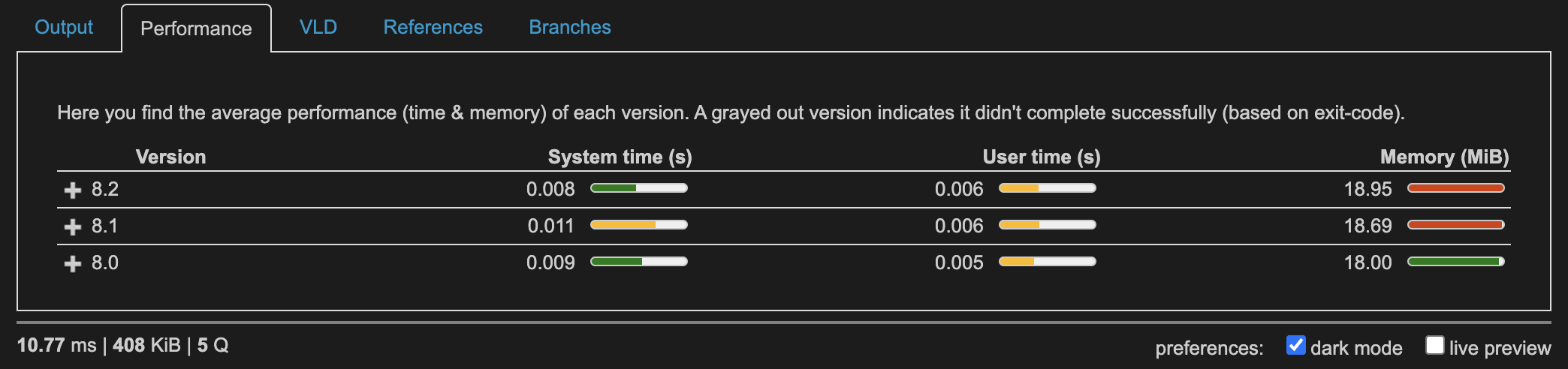
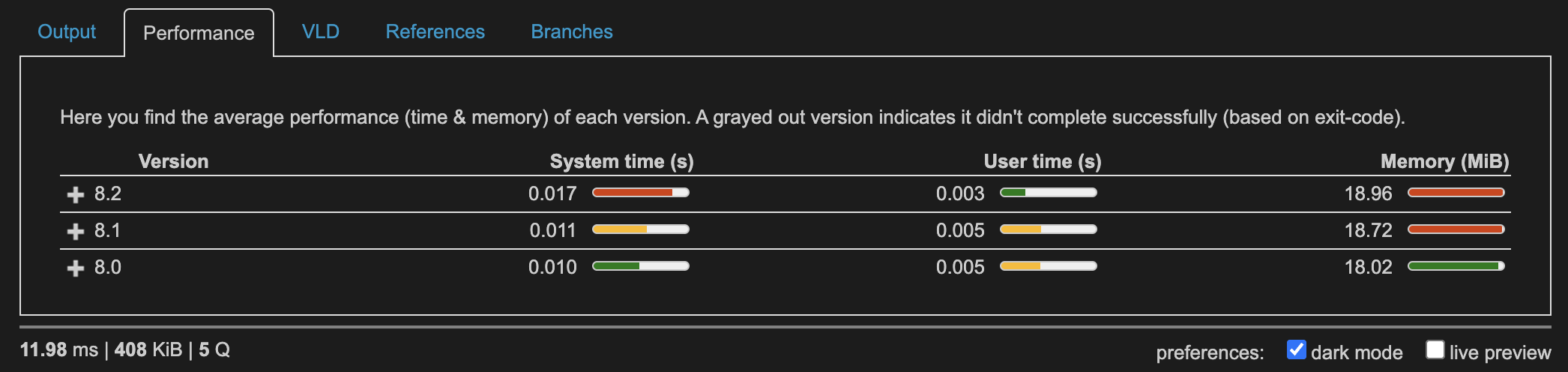
Performances:
With array_reduce
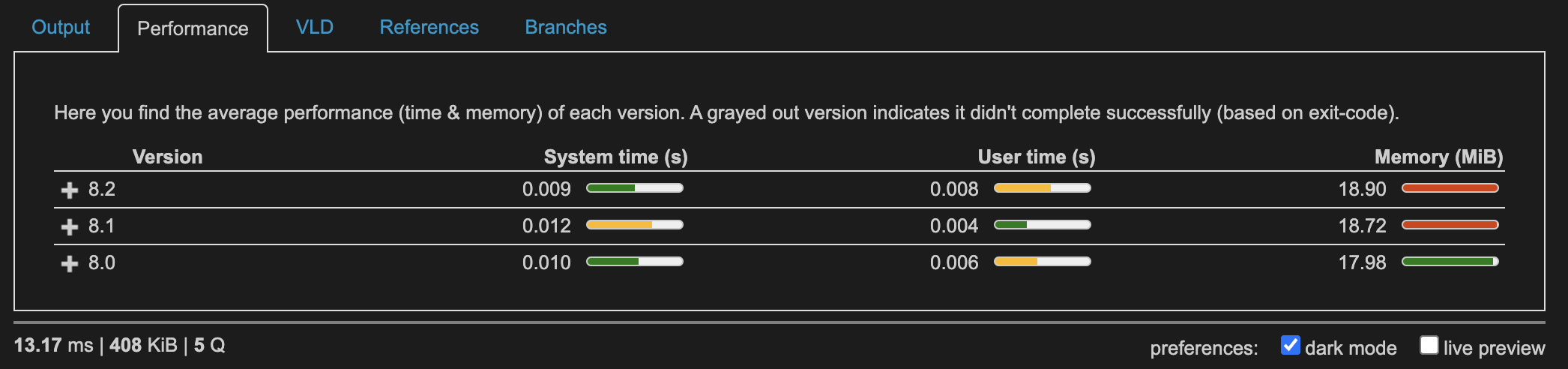
With multiple array_*
With foreach
Conclusion
At first, the array_reduce seems more complicated because you have a variable that is carried over each iteration that you can modify. In the end, you can see this as “call this function for each item and take what I return as the base for the next iteration. When done, return this result as the final one.”
To me, it helps reduce the number of iterations and improves readability over multiple array_* functions.
Performance-wise you won’t gain much unless you nest multiple array functions, in which case you might even lose some performance. Considering the numbers shown, I don’t think this should be an issue for most projects out there.
Regarding the last example (the advanced one), the foreach might be easier to implement / read, but beware that I created a function (or a method if in a class) to avoid leaking unnecessary variables.
Let me know what you think!